Купи eSIM
  • Home
  • Info
  • Support
  • Affiliate program
  • Sign up
  • Login

    Country not found. Check the name or try another spelling.

    How do I check my eSIM data balance?

    Open the relevant eSIM and select “Data balance” on its plan card. The details page provides information about used and remaining data and, for a bundle that has started, its validity period.

    Updated 2 October 2026

    • Check your balance
    • Understand the figures
    • Refresh the information
    • Questions

    Where to see your remaining data

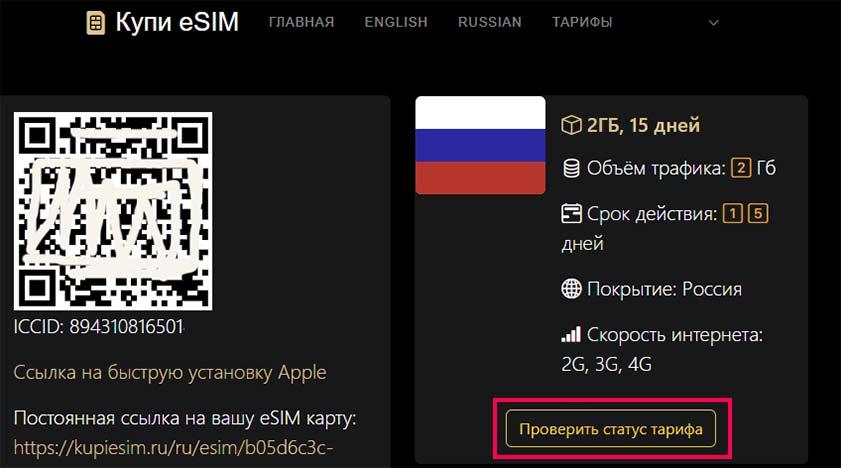
    1. Open your account with your eSIMs. You can also use the saved link from your purchase email to open the eSIM page - the same page that contains its QR code.
    2. Find the relevant eSIM by its ICCID and select its plan. If you have several bundles, check them separately: the page does not show a combined balance for all bundles on the eSIM.
    3. Select “Data balance”. Review both the remaining data and the plan’s expiry date.

    You need an internet connection to check the balance. If your eSIM has run out of data, open the website using Wi-Fi or another SIM.

    Open my eSIMs
    View screenshot examples

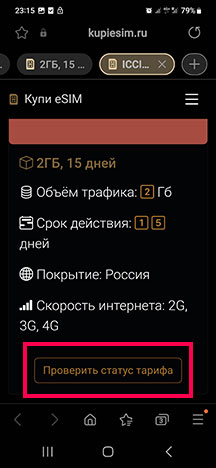
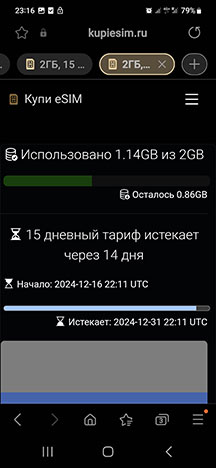
    These four screenshots show the current Russian website interface: the eSIM page and data balance on desktop and mobile. Pink outlines and numbers are added as a guide. All data is illustrative and the QR code is hidden; the balances and dates are not your order details.

    Select any screenshot to open it at full size in a new tab.

    On a computer

    Desktop eSIM page: a Turkey 10 GB, 30-day plan with its data balance button outlined and marked 1.
    The eSIM page on desktop

    Find your bundle under “Plans on this eSIM”. Select the highlighted “Data balance” button marked 1 at the bottom of its card (“Остаток трафика” in the screenshot).

    Desktop balance page: labels 2–5 highlight 6.4 GB remaining, 3.6 GB used, 18 days left and the refresh button.
    The data balance on desktop

    The left block shows 6.4 GB remaining out of 10 GB and 3.6 GB used. The right block shows 18 days left and the exact expiry. The “Refresh” button is at the top right (“Обновить” in the screenshot).

    On a phone

    Mobile eSIM page: the data balance button below a Turkey 10 GB, 30-day plan is outlined and marked 1.
    The eSIM page on mobile

    Scroll to “Plans on this eSIM”. The “Data balance” button marked 1 is below the selected plan’s details (“Остаток трафика” in the screenshot).

    Mobile balance page with labels 2–5 on 6.4 GB remaining, 3.6 GB used, 18 days left and the refresh button.
    The data balance on mobile

    The blocks appear one below the other: remaining and used data first, then time left. Scroll down to see plan details and the last update time.

    What the numbered highlights mean

    1. Open the selected plan’s balance

      The “Data balance” button opens this bundle’s information. Each plan on an eSIM has its own button and balance.

    2. Remaining data — 6.4 GB

      This is the internet allowance still available. The original 10 GB allowance appears below it. The bar shows the proportion remaining: 64% in this example.

    3. Used data — 3.6 GB

      This is the amount already consumed: 10 − 6.4 = 3.6 GB. The row is at the bottom of the data block.

    4. Time left — 18 days

      This is the remaining time, rather than the original plan duration. The exact expiry below is 20 October 2026 at 12:00 MSK (Moscow time). Any unused allowance is unavailable after the bundle expires.

    5. Refresh the information

      Select “Refresh” at the top to request the latest balance. The last successful update time is at the bottom of the page: 12:00 MSK in the example.

    Understanding your plan details

    Used data
    The amount already used from the selected bundle, shown at the bottom of the remaining data block.
    Remaining data
    The data left in the selected bundle. It is available while the plan remains valid; having data left does not extend the validity period.
    Start and expiry dates
    The “Activated” and “Expires” fields show the date and time. Check the time zone beside them too: the exact expiry is more useful than a rounded number of days remaining.
    Time left
    The remaining validity period of an active bundle. A queued bundle shows “Not started” instead of a countdown; its validity begins after activation.

    The balance page uses GB, or MB and KB for smaller amounts, rounded to two decimal places. 1 GB = 1000 MB and 1 MB = 1000 KB. Amounts below 0.01 of the displayed unit are shown as “< 0.01”.

    How to refresh the information

    One plan’s data balance
    Select “Refresh” on the details page to request the selected plan’s data again. The balance figures do not update automatically while the page is open.
    Plan statuses in your account
    Select “Packages Status update” and wait for the result. If the list has not refreshed, use “Show updated statuses”. Open the relevant plan to view its detailed balance.

    The “eSIM Status update” button checks the eSIM itself, such as whether it is installed on your phone. It does not show a plan’s remaining data.

    If you have an unlimited plan

    For unlimited bundles with speed limits, the counter may represent the remaining full-speed data allowance. Using it up does not always disconnect your internet: speeds may be reduced under the plan’s terms. When full speed returns depends on the particular plan.

    Frequently asked questions

    What does “Unavailable” mean?

    This label alone does not identify the cause. A fixed-data plan may have run out of data or expired, or there may be a problem retrieving its details. Refresh the information and check the plan’s terms. For an unlimited plan, also consider its speed restrictions.

    Why is the start date missing?

    A bundle that has not started yet may have no start date. For example, it may be waiting for its first use in a covered country. If you are already using this plan, refresh the information; contact support if the issue persists.

    My phone shows different data usage

    Your phone keeps its own statistics for a selected period, which may differ from the bundle’s validity period. Check that you are viewing the correct SIM and comparing the same period. Use the plan details on the website for its remaining balance; contact support if a discrepancy persists.

    The refresh failed or timed out

    A failed check does not mean your data has run out. Check your internet connection and try again later. If you need one plan’s balance, try opening its details page separately. Report repeated errors to support.

    Have your eSIM ICCID, plan name and the error message or a screenshot of the balance ready. You do not need to send the installation QR code.

    Contact us on Telegram Contact us on WhatsApp
    Our Dzen
    Articles
    • Conditions of Use
    • Privacy Notice
    • Account and data deletion
    • Contacts
    2023-2026 © Copyright Купи eSIM. All Rights Reserved

    We use cookies to operate this website and measure visits through Yandex Metrica. Learn more in our privacy policy.